Work instructions your floor can actually follow.
Build clear, media-rich instructions, keep them current with simple, native version-control, and put the right revision in front of every operator. Start for free in the editor — upgrade when you're ready to use them for production.
Free to use the editor. No credit card required.
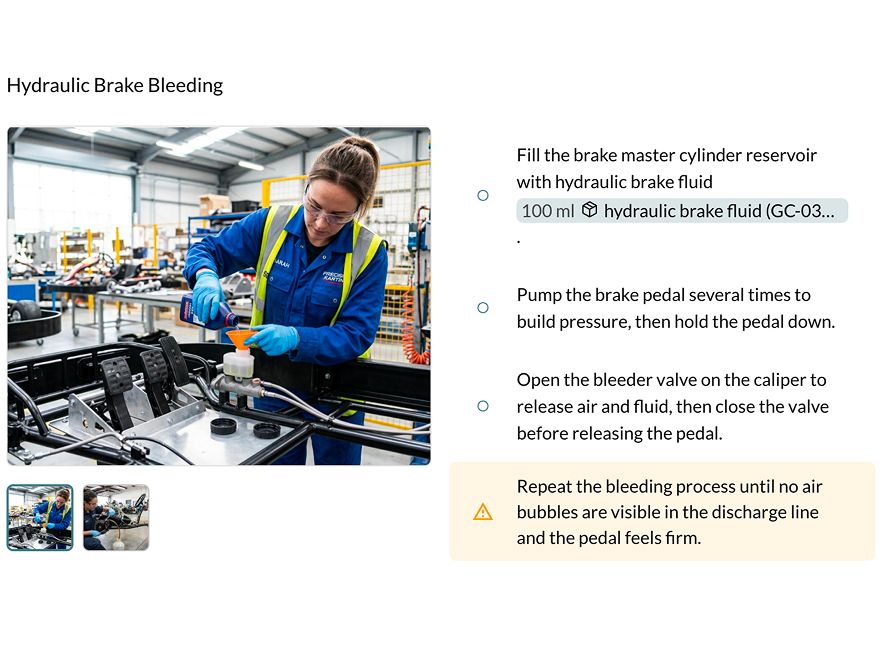
One place to author, control, and improve the work.
Most work instructions are locked in Word docs and PDFS, and go stale the day they ship. Threaded makes them living documents where updates land in the right place and every operator sees the version that matters.
Author great instructions in minutes.
A clean, structured editor gets a complete instruction together fast — steps, images, video, callouts, and links to the exact parts and tools every step needs.
- Rich media built in including photos, annotations, and video
- Link steps to materials, tools, and adjacent operations
- AI can help you draft, tighten, and standardize as you write
- One source of truth — no more "which PDF is current?"
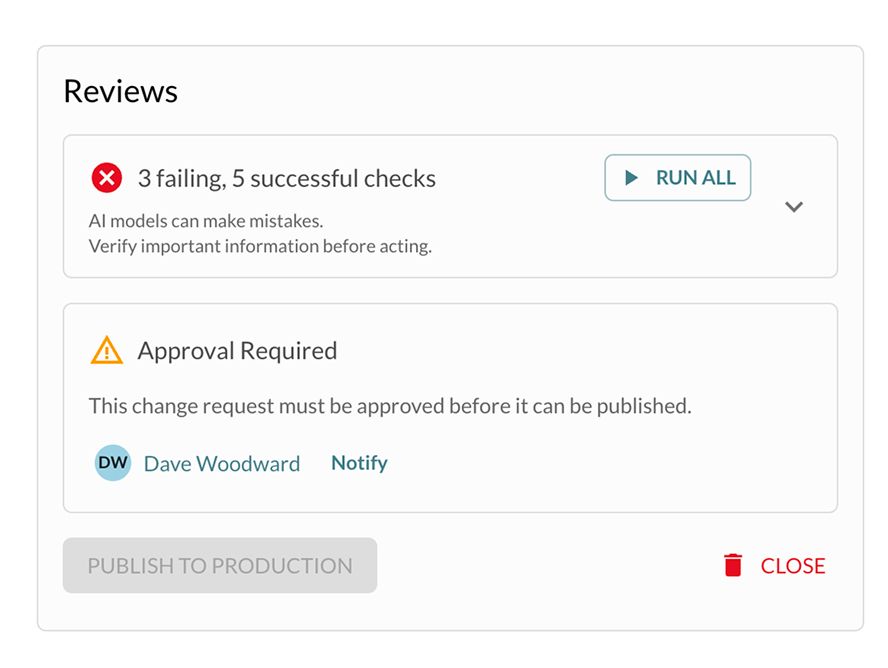
Version control for the team. Compliance follows.
Every change is tracked, reviewed, and approved in context with diffs and a full revision history. When version control exists to help people iterate, compliance isn't a separate burden — it's the byproduct of the work getting done.
- Full revision history with diffs to see exactly what changed and why
- Review and approval workflows without leaving the instruction
- Automated AI checking verifies technical writing and visuals, fixes errors, and addresses drift before release
- Audit-ready trail — without running in "compliance mode"
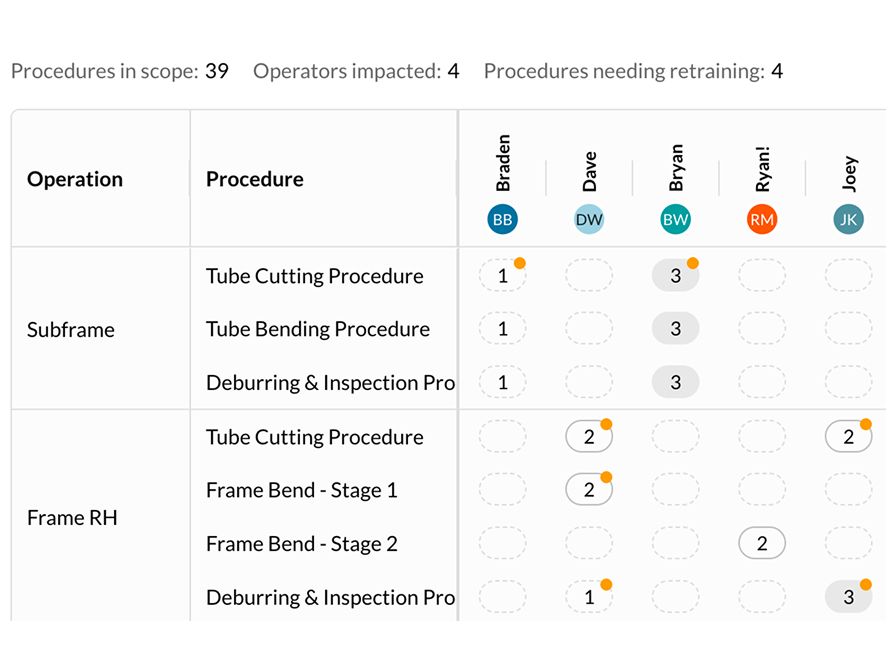
Tie training to the work, not a binder on a shelf.
Certification lives right alongside the instruction it covers. Sign off operators, see who trained them and when, and read your competency matrix in real time — so you onboard faster, build quality in, and always know who's cleared to run what.
- Live competency matrix by operator and procedure
- Sign-offs and re-certification tracked against current revisions
- Training stays attached as instructions change
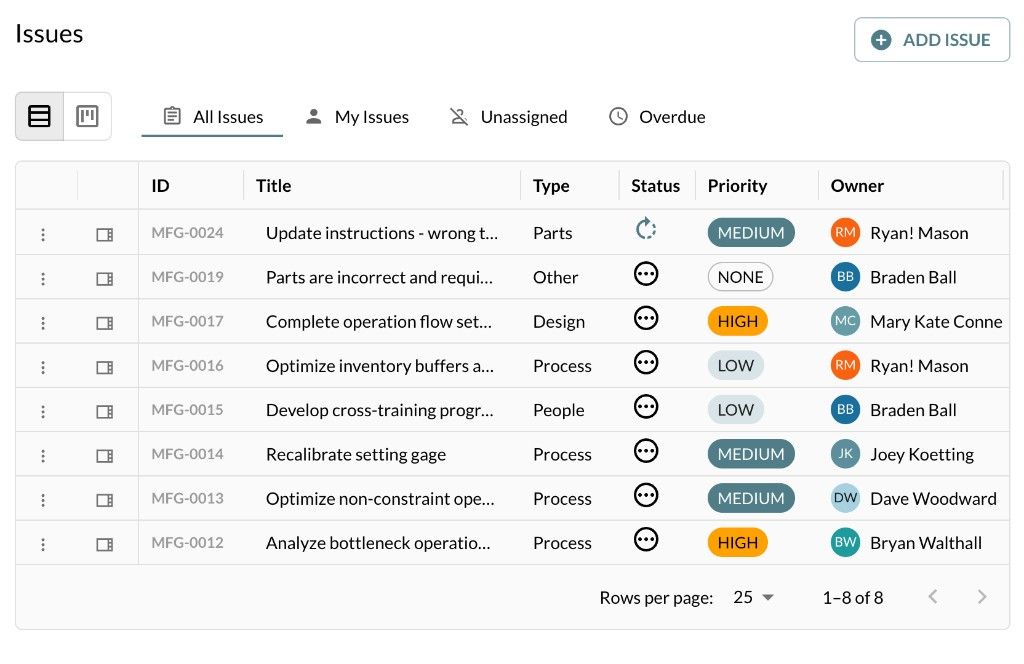
Close the loop with the people doing the work.
Operators are the first to spot when an instruction doesn't match reality. From operator mode, they can flag a problem on the exact procedure — a missing detail, a tool that changed, a safer way — and it routes straight back to the author with full context. Instructions stop drifting away from the floor and start improving from it.
- Flag issues on a specific procedure, right from operator mode
- Feedback routes to the author with step-level context
- Turn floor knowledge into tracked, reviewable improvements
- Catch drift early — before it becomes a quality or audit problem
More that comes built in.
Everything that makes a work instruction usable on the floor — and connectable to the rest of your stack.
Operator Mode
A clean, read-only view built for the floor — distraction-free, always on the released revision, and easy to follow on a phone, tablet or workstation screen.
Automated Checking
AI reviews instructions for technical writing compliance, missing steps, unclear language, and drift from the actual process — and can then make corrections in context before anything ships to the floor.
MCP & CLI Connections
Reach your instructions programmatically — via the command line or through MCP — so your own tools and AI agents can read, generate, and update them in context.
Start free. Upgrade when you're running production.
Start creating great instructions for free in the editor. Unlock control, training and the power of AI when work instructions become how you run production.
Everything you need to start authoring great work instructions.
- Full work instruction editor
- Images, annotated photos & embedded video
- Linking to materials, tools & procedures
- AI-assisted authoring
- Issue capture and tracking
Control, collaboration, and expanded AI for productivity.
- Everything in Free, plus:
- Multiple collaborators
- Version control, review & ISO-ready audit trail
- Automated AI checking
- Read-only operator mode
- Training & certification matrix
- MCP & CLI connections
Work instructions are where most teams start — but Threaded is built for the whole operation. Enterprise unlocks the full platform with optional forward deployed engineering when you want a partner in the room, not just software.
Let's talk! →- Everything in Pro, plus:
- Analytics — connect ERP, MES, or spreadsheets and use AI to interrogate your operation and find what to improve
- Process Planning — engineer capacity with cycle times, line balancing, and constraint targeting across your value stream
- Migration, integrations, and factory data connections
- Optional forward deployed engineer embedded with your team
- Priority support and hands-on transformation partnership